Skip to content
← All work
Case study · ASU Learning Engineering Institute

ReQuesta

We tested the experience before the intelligence behind it was fully connected.

An AI tool that turns ASU faculty's course materials into quiz and exam questions. I helped make its workflow clearer and more controllable, then built the systems that keep that clarity through implementation.

My role Product Designer · one of three designers · ASU LEI and ASU Enterprise Technology

  • 5 sessions
  • 16 faculty
  • 50 findings logged
  • 6 v2 flows
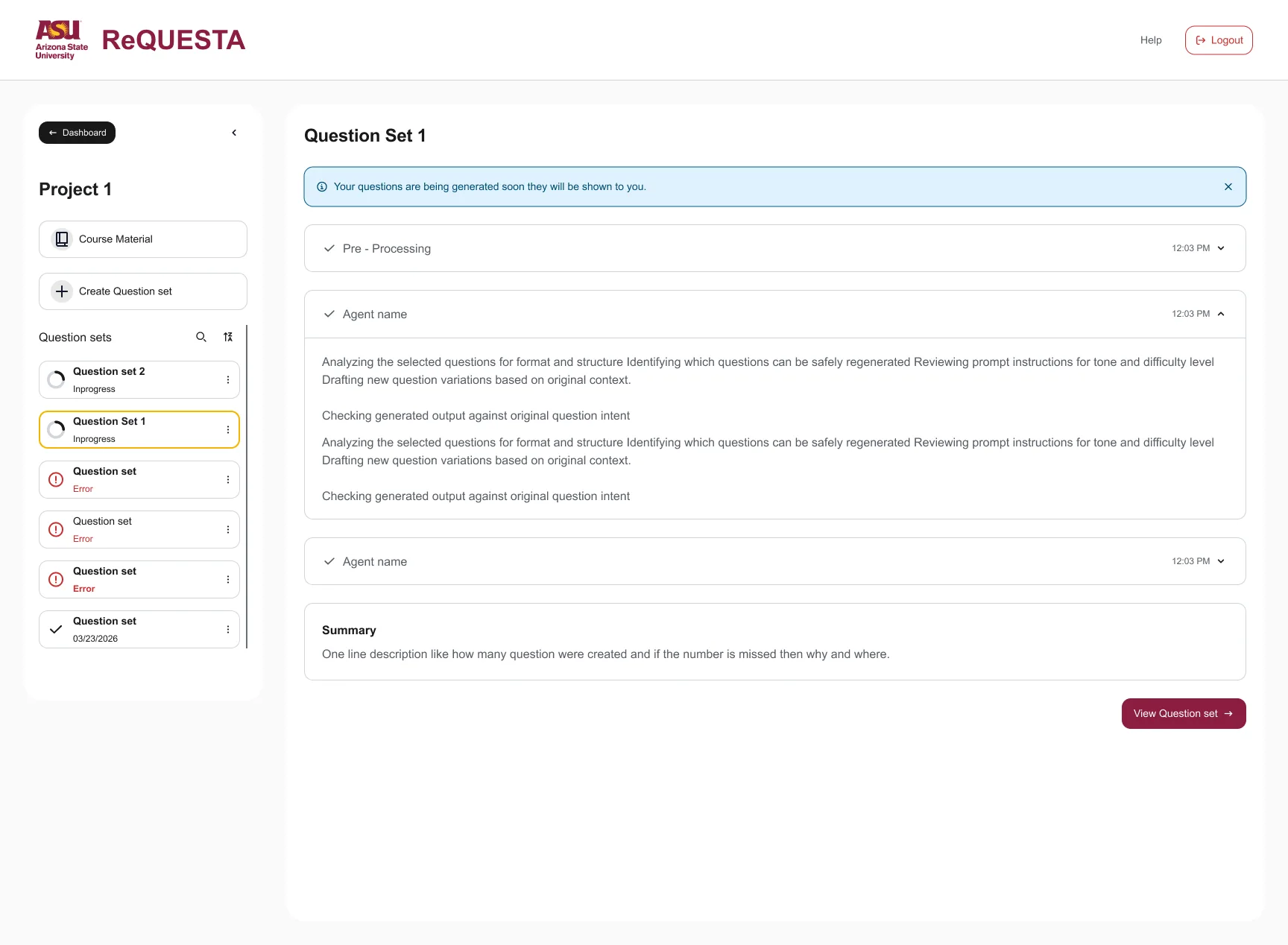
The real ReQuesta Workflow Details screen after generation: each agent step shows a check mark and a time, a summary card sits below, and a View Question set button leads on.
Real v2 design · Workflow Details, completed

In 30 seconds

The problem

Faculty needed clearer orientation, visible control, and understandable progress before trusting the workflow. The generation services weren't ready to test yet.

What we did

Tested a clickable prototype with 16 faculty, logged a decision for every finding, and designed v2 across 6 flows.

Where it stands

v2 is designed and documented. Some items are in development or saved for later, and each one is labelled.

Status labels

Research evidence, design decisions, and delivery status are labelled separately. Nothing on this page is labelled shipped.

How evidence and delivery statuses are labelledOpen to see what each badge means
  • Observed in researchIn the faculty research report
  • Designed in v2In the current Figma design, team-reported
  • Reported in developmentBuilt or being built by developers, team-reported
  • Future iterationAccepted, deliberately saved for later
  • Leadership decisionEscalated beyond the design team
  • Needs verificationPlausible, not yet confirmed
ChaptersJump to a chapter
  1. 01Two tracks
  2. 02Research evidence
  3. 03Evidence to priorities
  4. 04The v2 screens
  5. 05Workflow Details
  6. 06The system
  7. 07Export rules
  8. 08Where it stands
01 · Two tracks, one productPrototype mode

Learn from faculty while engineering learns what's feasible.

The generative services that write the questions were still being built. Waiting for them would have meant learning about faculty trust only after the expensive part was finished. So we built a research prototype in 3 days while engineering tested feasibility.

How to read thisTwo questions, asked in parallel: will faculty understand and trust it, and can the pipeline work?

With pre-written questions, it could test

  • Orientation and terminology
  • Navigation and next steps
  • Perceived control and trust

It could not test

  • Model quality and speed
  • File-processing accuracy
  • Pipeline reliability
02 · Research evidenceResearch mode

Faculty liked the layout. They needed more orientation, control, and transparency.

5

Remote moderated sessions, April 28 to May 6, 2026

16

ASU faculty from math to the humanities

7

Evaluated task flows, first visit to export

15

Post-session questionnaire answers from faculty

The research team ran five sessions with 16 ASU faculty. I helped synthesize the evidence and translated it into interface and system priorities.

Moderation: Shailee Shah and Ishrat Ahmed. Report: Shailee Shah, Ishrat Ahmed, and Scotty Craig. I own the design decisions shown here.

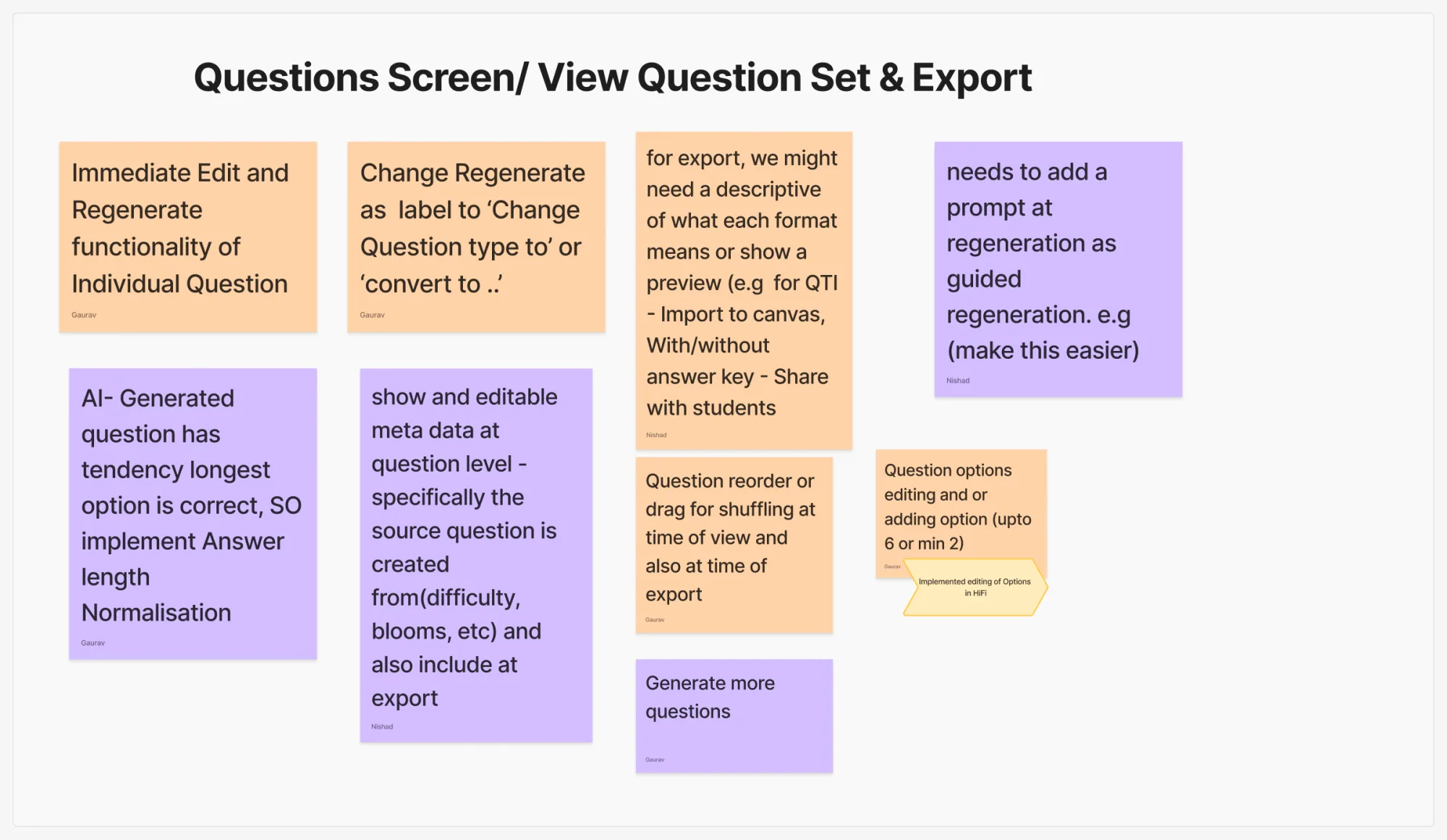
The team's FigJam synthesis for the question review and export tasks: sticky notes recommend immediate per-question Edit and Regenerate, clearer labels such as Change question type to, guided regeneration with a prompt, editable metadata, export format descriptions, reordering, and generating more questions.
Real synthesis board · Tasks 6 and 7

50 findings clustered into six themes

These labels summarize the research. Open the section below to read what faculty experienced.

  • First-use orientation
  • Course-material and source clarity
  • Configuration language
  • Transparent generation progress
  • Visible per-question control
  • Export confidence and compatibility
Explore the six research themesWhat faculty experienced before those themes became design priorities

First-use orientation

Faculty weren't sure what the tool was for, what a project or question set meant, or what to do next.

Course-material and source clarity

"Knowledge" was easy to miss, and the two file roles did not explain how each source affected the AI.

Configuration language

Labels did not match how faculty plan assessments. "Fast vs Slow" was mistaken for difficulty.

Transparent generation progress

Processing messages moved too quickly to read, and the total question count was easy to miss.

Visible per-question control

Edit and Regenerate were hard to discover, and faculty could not guide regeneration.

Export confidence and compatibility

Faculty could not tell the formats apart or which QTI—the file format Canvas imports—would work.

03 · Evidence to prioritiesStrategy mode

Every finding got a decision and a current status.

Each priority connects what faculty experienced to the change it produced.

50 findings6 themes6 v2 flows

  1. Unclear first-use journey

    Observed in research
    New faculty didn't know where to start.
    Decision
    An empty state that names the next step, and an action label instead of "View".

    Designed in v2

    Product risk and status detail
    Product risk
    People leave before they reach any value.
    Status detail
    Broader onboarding is reported in development.
  2. "Knowledge" and file-role confusion

    Observed in research
    "Knowledge" and the two file roles were unclear.
    Decision
    Course Material, named file roles, an AI usage notice, and copyright guidance.

    Designed in v2

    Product risk and status detail
    Product risk
    AI sources feel opaque, so trust drops.
    Status detail
    Google Drive and URL import are saved for a later iteration.
  3. Configuration and processing language

    Observed in research
    "Fast vs Slow" read as difficulty.
    Decision
    Generation Quality, formats per type, and Bloom's removed rather than faked.

    Designed in v2

    Product risk and status detail
    Product risk
    Faculty misread quality, difficulty, and what they controlled.
    Status detail
    A difficulty control is not confirmed in the current scope.
  4. Buried Edit and Regenerate

    Observed in research
    Per-question controls were hidden in a menu.
    Decision
    Controls on every card, plus guided regeneration with an optional prompt.

    Designed in v2

    Product risk
    Product risk
    Faculty can't efficiently correct individual questions.
  5. Opaque generation progress

    Observed in research
    Progress messages vanished too fast to read.
    Decision
    Workflow Details: queued, working, completed, and a summary.

    Designed in v2

    Product risk
    Product risk
    Waiting feels like a black box.
  6. Export and Canvas uncertainty

    Observed in research
    Faculty couldn't tell the formats apart.
    Decision
    One modal: choose questions, metadata, answer-key placement, and a described format.

    Designed in v2

    Product risk and status detail
    Product risk
    Good questions never make it into Canvas.
    Status detail
    Developers built the format mappings and Canvas import support.
Explore all 50 task findingsOpen the searchable table, then choose a status or priority to filter the evidence
  • Designed in v231
  • Reported in development7
  • Future iteration6
  • Leadership decision2
  • Needs verification4
  • 24 of 50 were rated High priority in the report.

Research findings and team-reported responses. Priority comes from the research report; responses and statuses come from the team's action log, dated September 30, 2026.

TaskObservedPriorityTeam responseStatus
T1Unsure what to do when the dashboard is emptyHighEmpty dashboard that leads to the first question setDesigned in v2
T1"Create project" didn't signal question creationLowProject onboarding flow, reported as coming soonReported in development
T1No next step after naming a set; "View" felt passiveHighAction label and a next-step cueDesigned in v2
T1Page purpose unclearLowOne-line descriptor through onboarding, reported as coming soonReported in development
T1Wanted a role and course setup stepLowPersonalized first-run setup deferredFuture iteration
T2Scope of a "question set" unclearLowHelper text by the name fieldDesigned in v2
T2Question types not visible on this pageHighQuestion format shown for each typeDesigned in v2
T2"Knowledge" tab unnoticed and too genericHighRenamed Course MaterialDesigned in v2
T2A passive nav item looked clickableMediumClear active and current statesDesigned in v2
T2Unsure whether actions had a required orderLowOrder to be explained in Question Set InstructionsNeeds verification
T2Collapse icon misread as "add files"LowStandard collapse iconDesigned in v2
T3"Question creation" vs "Context" files confusingHighExplicit titles, with examples in a popoverDesigned in v2
T3Context-file tooltip contradicted expectationsHighTooltip rewritten as an AI usage noticeDesigned in v2
T3No PowerPoint uploadHighLater iterationFuture iteration
T3No Google Drive or link uploadLowLater iterationFuture iteration
T3Leaving for the Knowledge tab felt like losing workHighLeave-confirmation check (not auto-save), on the development sideReported in development
T3Existing project files mixed with new uploadsMediumTooltips plus remove and delete; clear grouping not yet verifiedNeeds verification
T3Same helper text repeated three timesLowUpload area restructuredDesigned in v2
T3Expected to type instructions, not just uploadHighPrompt input addedDesigned in v2
T3Copyright concerns not addressedMediumCopyright guidance in the upload areaDesigned in v2
T4Unclear what the configure screen producesMediumCopy updatedDesigned in v2
T4"Fast vs Slow" read as difficulty or speedMediumRenamed Generation Quality, with a tooltipDesigned in v2
T4Category labels didn't match faculty vocabularyHighBloom's removed; question types explained in helper textDesigned in v2
T4No difficulty controlHighNot in the current project specsNeeds verification
T4Question type not selectable before generatingHighType chosen in configuration and during regenerationDesigned in v2
T4Bloom's mentioned with no matching controlMediumBloom's removedDesigned in v2
T4STEM faculty felt excludedLowLater iterationFuture iteration
T4Leading zero in count fields confused peopleLowStandard number inputDesigned in v2
T4Framing felt mechanical, not pedagogicalMediumGoals go in the prompt; type and format stay requiredDesigned in v2
T5Processing screen too fast to readHighWorkflow Details with a completion summaryDesigned in v2
T5Bloom's label implied an input that didn't existMediumBloom's removedDesigned in v2
T5Expected Bloom's tags on each questionMediumResolved by removing Bloom'sDesigned in v2
T5Total question count missedMediumCount may be added to the summaryFuture iteration
T6Edit control not visibleHighMenu removed; controls on each question cardDesigned in v2
T6Regenerate not a first instinctHighMenu removed; controls on each question cardDesigned in v2
T6"Regenerate as [type]" unclearHighNew regeneration flowDesigned in v2
T6No way to guide regenerationHighRegeneration modal: target format plus an optional promptDesigned in v2
T6Correct answer was always the longest optionHighCame from prototype placeholder text; production answer balance not yet verifiedNeeds verification
T6Question metadata not visibleHighQuestion type and format tags; other metadata not verifiedDesigned in v2
T6QTI version unclear for CanvasMediumCanvas-compatible versions built by developersReported in development
T6Export options confusingHighExport copy redesignedDesigned in v2
T6No "generate more questions"HighLater iterationFuture iteration
T6Way back to configuration not obviousLowQuestion set name in the headerDesigned in v2
T6Wanted more than four answer optionsMediumEditable options, 2 to 6Reported in development
T6Wanted reordering and answer shufflingMediumShuffling at question and option levelDesigned in v2
GenFaculty who don't use quizzes saw little valueHighScenario and visual modes, work in progressReported in development
GenEthics of faculty using AI for assessmentHighEscalated to project leadershipLeadership decision
GenMust beat the ChatGPT + QTI workflowHighEscalated to project leadershipLeadership decision
GenWanted memory across past projectsLowBeing added to onboardingReported in development
GenCopy assumed research-faculty materialsLowMicrocopy audited for inclusive examplesDesigned in v2
04 · The v2 screens

The decisions, on the real screens.

Two screens carry the main story: creating a question set and reviewing it.

01 Create Question Set

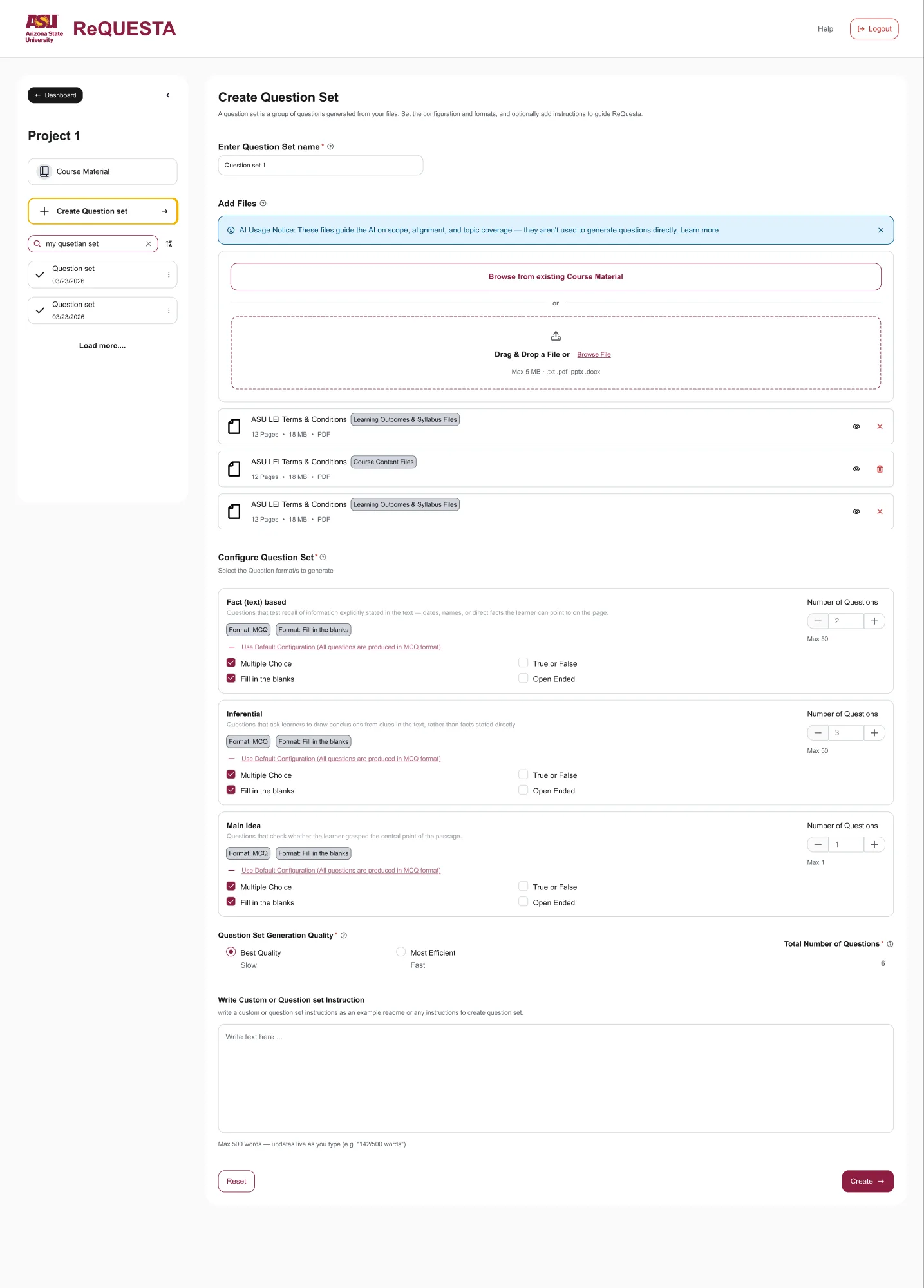
ReQuesta Create Question Set form: a one-line description of what a question set is, a name field, files added from existing Course Material or by upload, a Configure Question Set section where each question type shows its formats and a count, a Generation Quality choice between Best Quality and Most Efficient, a total question count, and a free-text instruction field.
Real v2 frame · Create Question Set
What you're seeing
One form for files, formats, quality, and instructions.
Why it mattered
Faculty misread “Fast vs Slow” and wanted clearer setup choices.
What changed
Named quality options, formats per type, a total, and an instruction field.
Evidence
Designed in v2Difficulty control is not confirmed in scope.

02 View Question Set

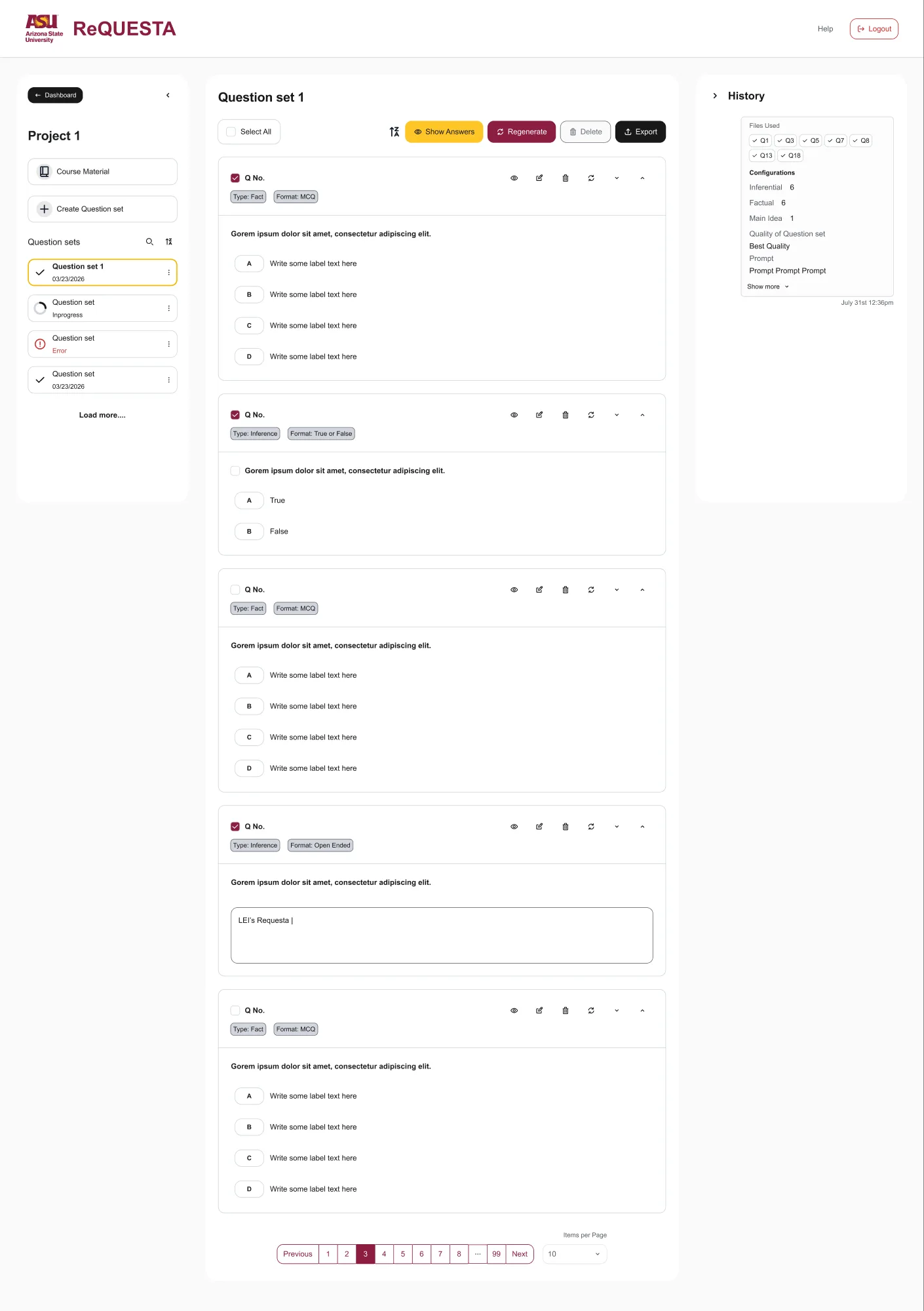
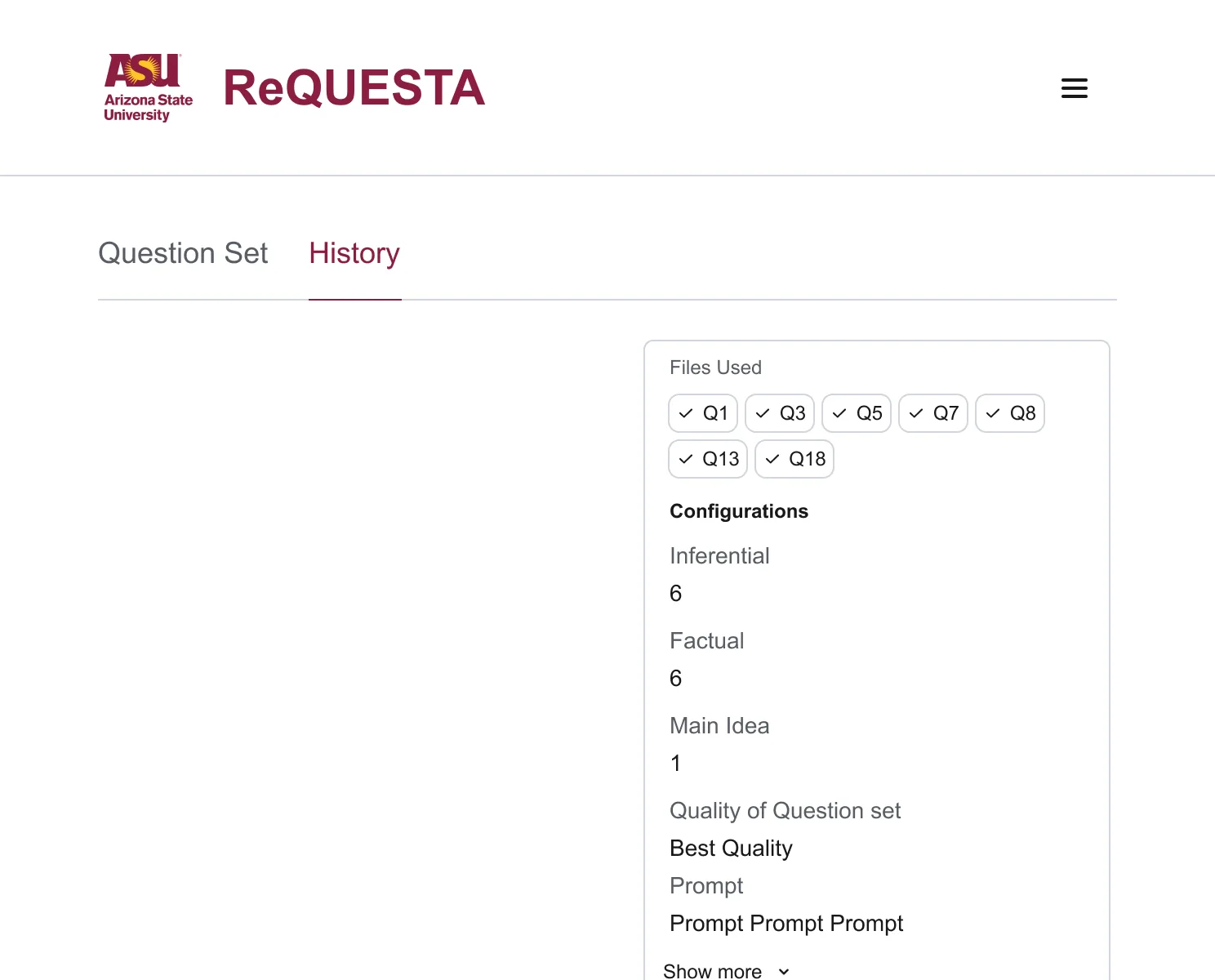
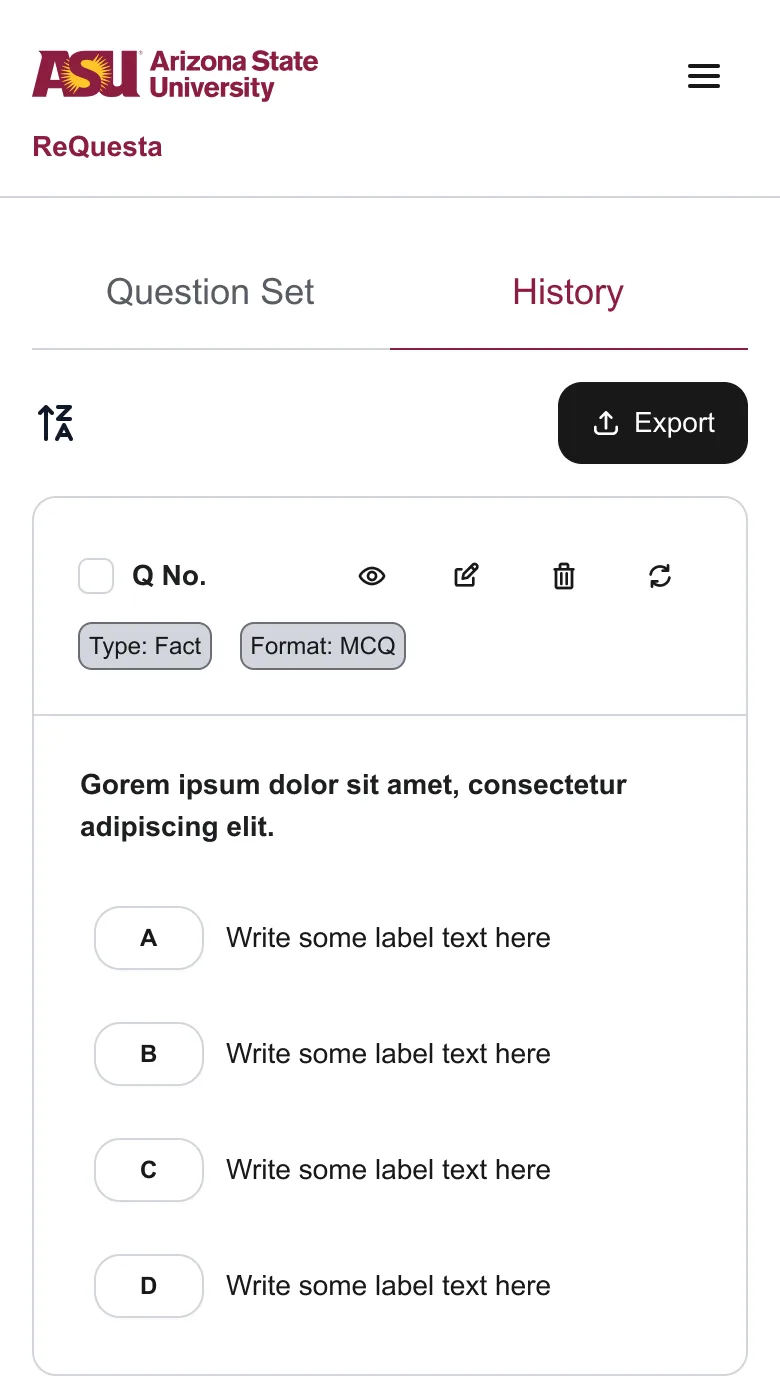
ReQuesta View Question Set: a toolbar with Select All, sort, Show Answers, Regenerate, Delete, and Export; question cards with type and format tags and visible view, edit, delete, and regenerate icons; and a History panel listing the files and configuration used.
Real v2 frame · View Question Set
What you're seeing
Question cards with tags, visible actions, and History.
Why it mattered
Edit and Regenerate were hard to find in a menu.
What changed
Actions on every card, clearer tags, shuffling, and guided regeneration.
Evidence
Designed in v2Question type and format are confirmed; other editable metadata is not.
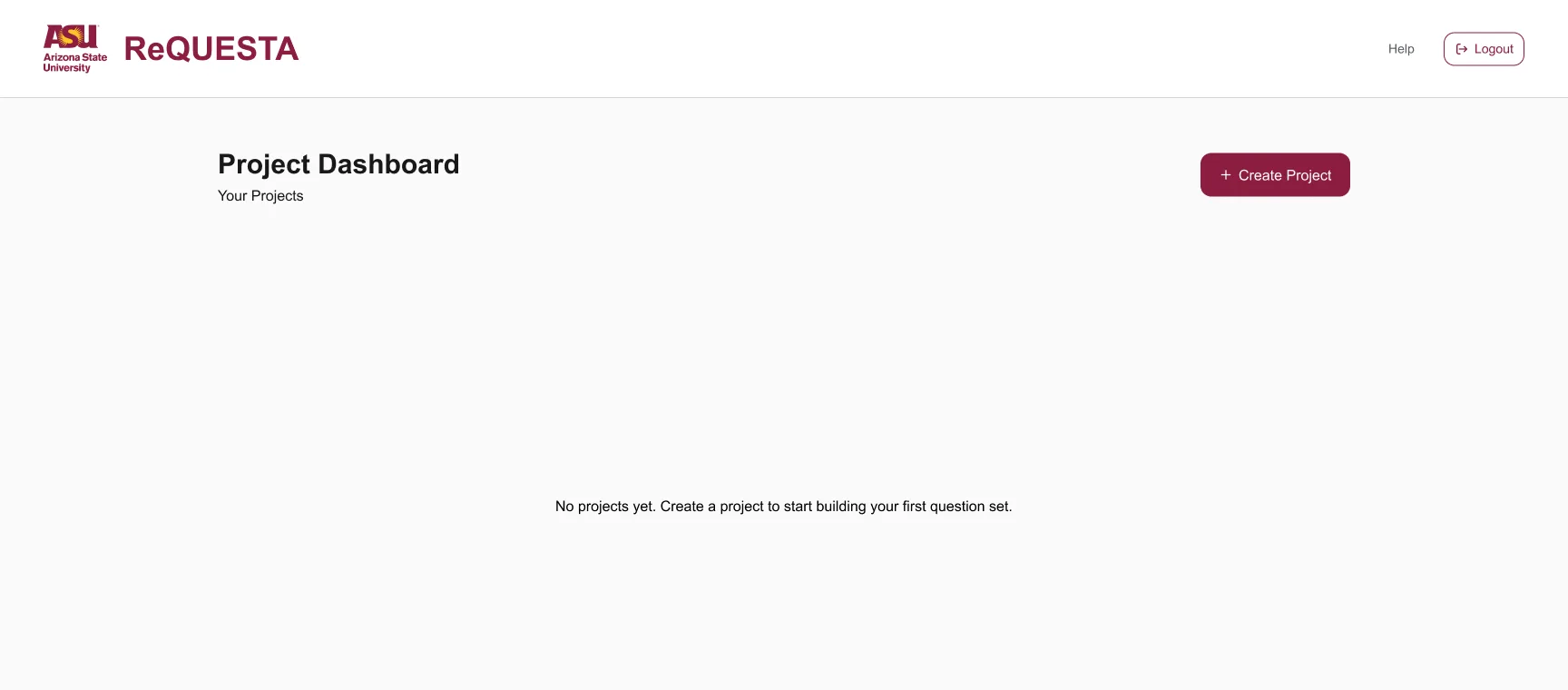
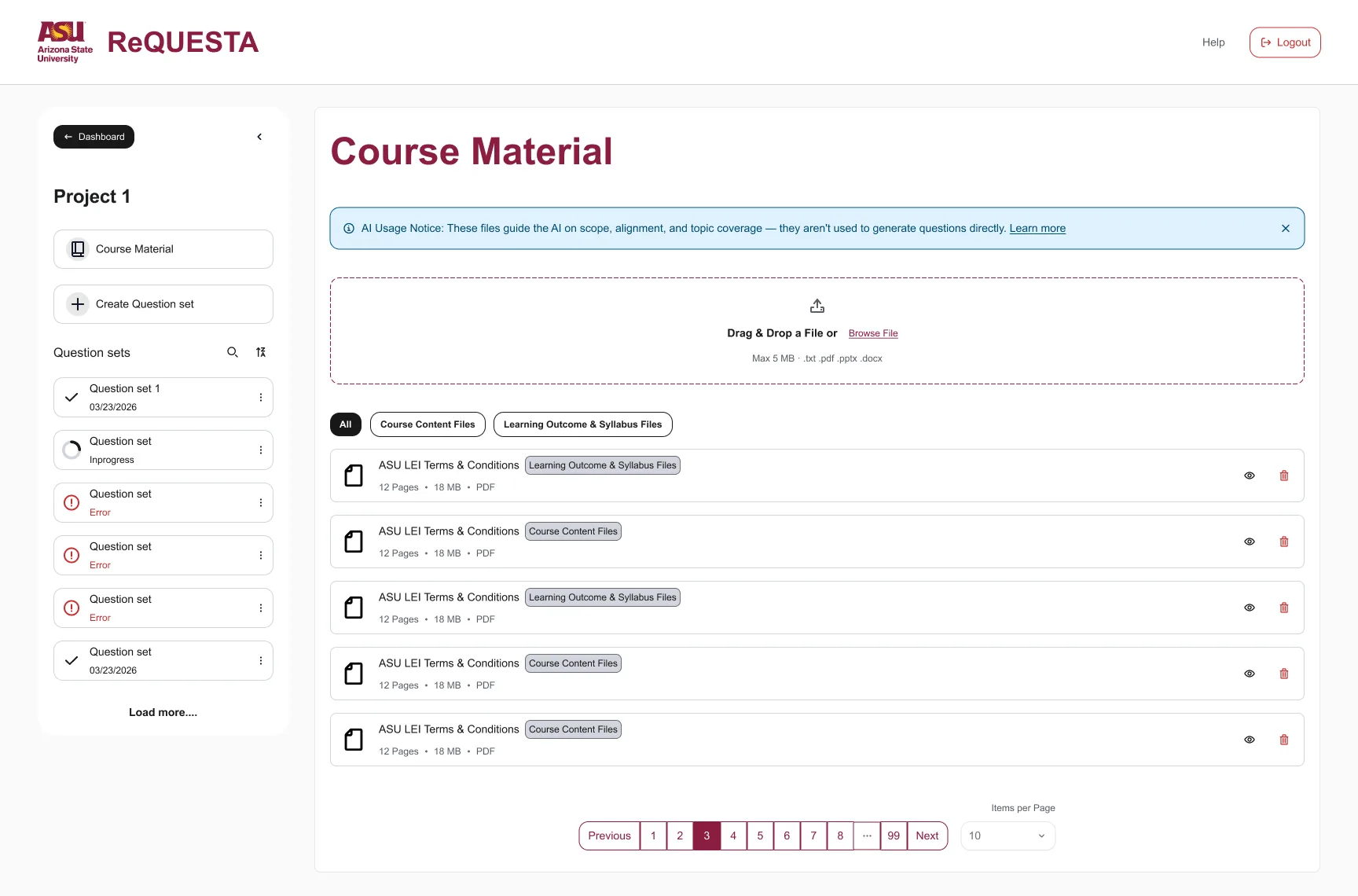
More screens: dashboard, course material, tablet, and phoneFour more real v2 frames, each with its finding and status
05 · Workflow Details

Show what's queued, what's working, and what's done.

Faculty needed readable progress—not a mysterious spinner.

Try the workflowChoose a state to update the highlighted screen area, or use Play to watch all four.

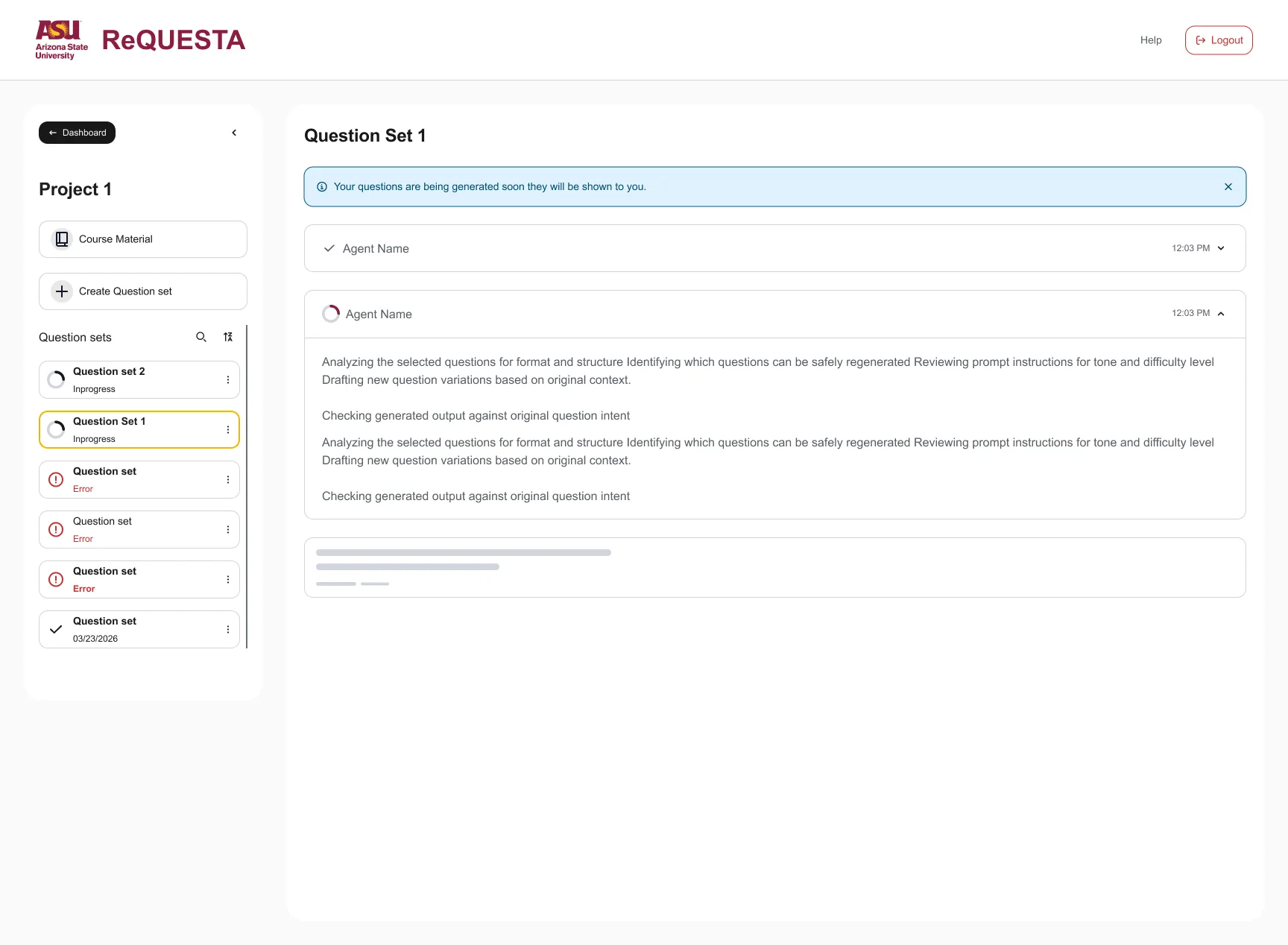
Real Workflow Details screen. The highlighted area matches the selected state below.

Summary ready. Every step is checked, a summary says what was made, and View Question set leads on.

  • Queued. A skeleton holds the place of the next step, so nothing appears out of nowhere.
  • Working. The active step expands with a plain-language description of what it is doing.
  • Checked. Finished steps collapse to a check mark and a time.
  • Summary ready. Every step is checked, a summary says what was made, and View Question set leads on.

Designed in v2 Two real frames cover all four states. No spinner pretending to think very hard.

06 · The system behind the screensBuild mode

The interface kept changing, so I designed the words to survive the change.

I structured the copy, components, and history so Figma and code could share one current answer.

See how the Figma and code bridge became two-wayThree dated releases, from Figma's own blog
  1. Figma → code, one wayFigma's Dev Mode MCP server gave code tools design context from Figma. Figma blog
  2. Code → Figma, now both waysClaude Code could turn working UI into editable Figma frames. Figma blog
  3. Agents write to the canvasClaude Code and Codex could build on the Figma canvas with the design system, guided by skills. Figma blog

Once code could change Figma too, loose text could drift in both directions. Named copy makes mismatches easier to spot.

Words

Named copy in Figma

Everyone can refer to the same interface text.

Components

Shared foundation, product patterns

ASU parts underneath; ReQuesta combinations on top.

Versions

Branches and a Design Log

One current file and a dated history.

Version control: one current file, every change logged

Old and new screens sat together, so developers sometimes built the wrong one. We compared three solutions.

  1. Duplicate each revisionSimple at firstHeavy files and "final-final" names
  2. Move old designs asideCleaner working pageHistory stays manual and linked
  3. Branches plus a visible Design LogChosenReviewable changes, one sourceNeeds ownership
  1. Branch, named for the feature or change
  2. Review
  3. Merge into the main file
  4. Log the version in the Design Log
  5. Developers hand off from main only

Retired copy stays searchable but separate, so “which one is current?” has one answer.

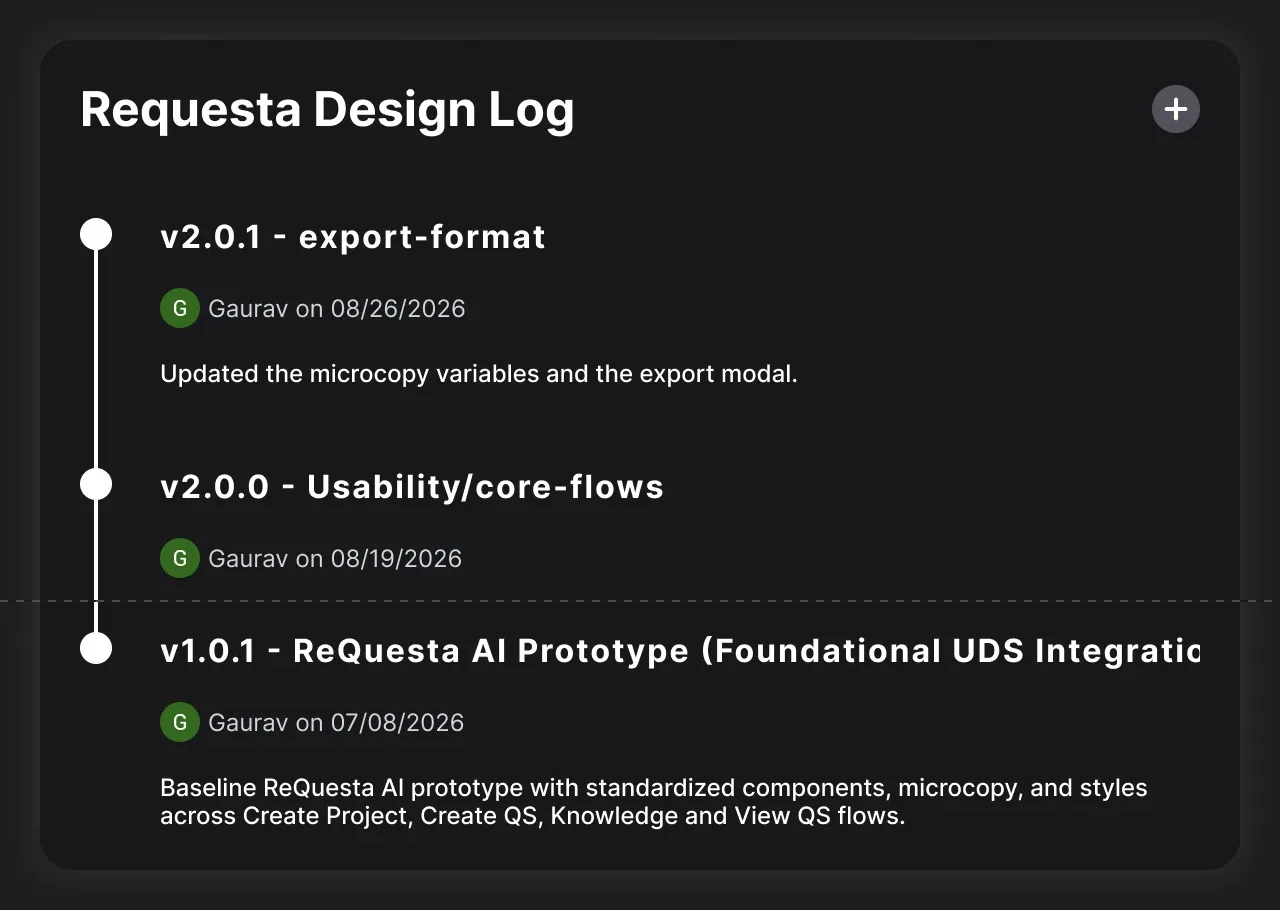
The real ReQuesta Design Log in Figma, cropped to the version headers: v2.0.1 export-format by Gaurav on 08/26/2026, updated the microcopy variables and the export modal; v2.0.0 Usability/core-flows by Gaurav on 08/19/2026; and v1.0.1 ReQuesta AI Prototype (Foundational UDS Integration) by Gaurav on 07/08/2026, a baseline with standardized components, microcopy, and styles across four flows.
Real Design Log · three versions in seven weeks

Designed in v2 Three releases. Figma clips the oldest title: “ReQuesta AI Prototype (Foundational UDS Integration).” No more “final-final-2.”

Explore the supporting system rulesNaming, responsive type, retired copy, and when components become shared
Naming

A grammar built with engineers

I tested three directions with a developer and used the structure that fit their workflow.

Type

Responsive text styles

Desktop and tablet/phone scales sit beside the copy system.

Retired copy

Searchable, but separate

Old copy leaves the active set without breaking files that still use it.

Variable naming grammar: type, then property, then descriptor, joined by underscores.

Type
The element or content role: button, title, input, helper, alert, badge, toast.
Property
How the text works: label, placeholder, helper, title, action, body, ARIA label, validation.
Descriptor
Which one it is: create question set, delete confirmation, add files, or enter a name.

When a component becomes shared

  1. Start with the shared ASU component when it meets the need.
  2. Extend it inside ReQuesta for product-specific behavior.
  3. Record why a shared component was changed and who owns the change.
  4. Move it into the shared system only after another project needs the pattern.
  5. Keep retired parts searchable but visibly separate.

Used by developers Developers use the named copy in the build; shared names make mismatches easier to catch.

Agent-assisted production

I gave the agent the system rules. It helped produce the work; I reviewed it and owned the decisions.

07 · Export rules

One structured source file, five formats.

Faculty needed question sets that worked outside ReQuesta. I used an agent to organize rules for five formats, including QTI—the file Canvas imports.

How to read thisEvery export format receives the same hierarchy and content rules.
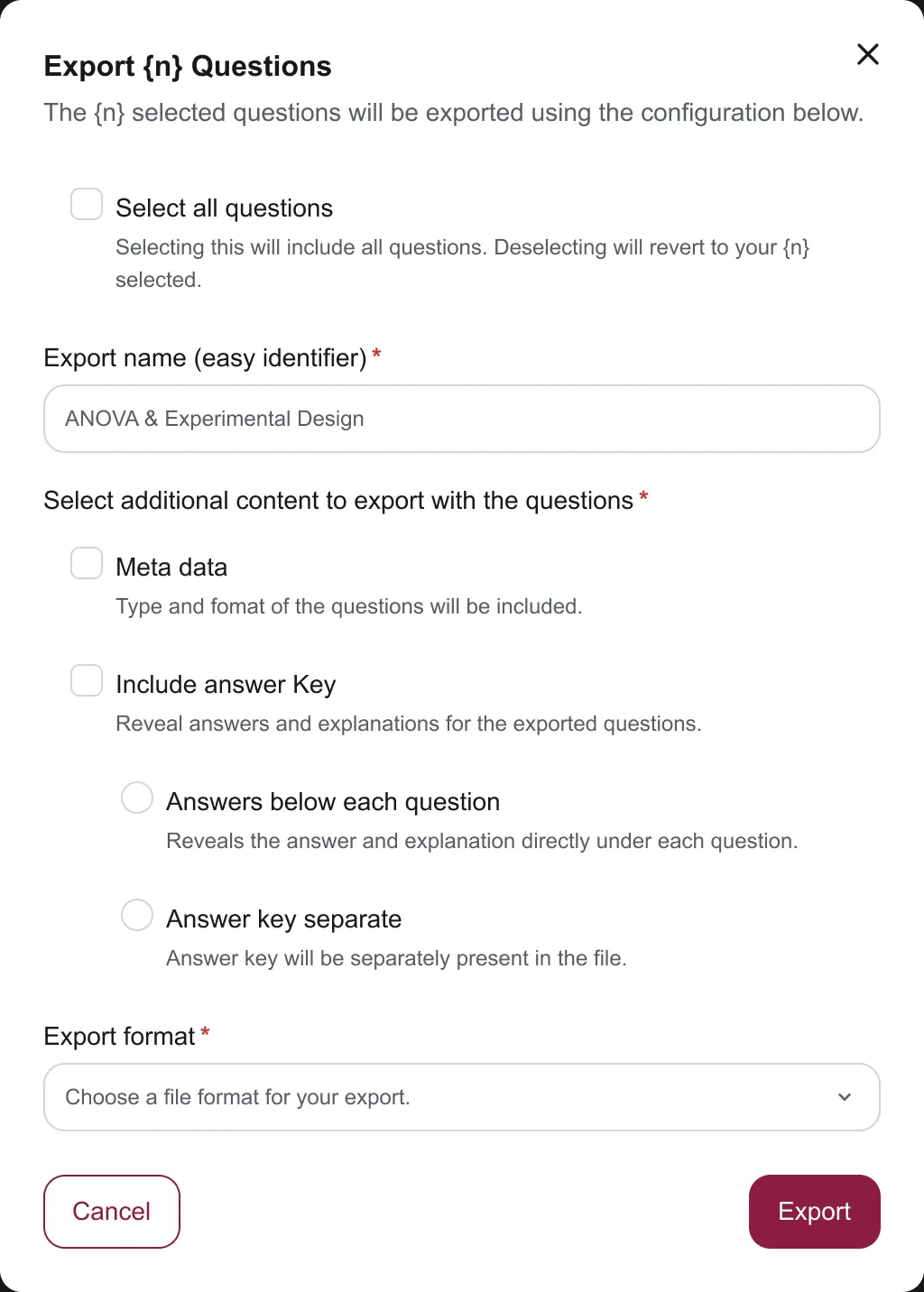
ReQuesta export modal: Export n Questions, with Select all questions, a required export name, optional metadata described as type and format, an optional answer key placed either below each question or as a separate section, and a required export format selector.
Real v2 frame · Export modal
For engineers: view the export rulesHow one source maps hierarchy, context, code, emphasis, order, and named labels

How the structured source carries meaning

Source conventionCarries
HeadingsDocument and question hierarchy, plus an accessible outline
BlockquotesQuoted or supporting context, kept separate
Fenced codeCode, equation source, and preformatted text
BoldA defined label or emphasis, with no font dependency
ListsQuestion order and answer-choice order
Named labelsMetadata, answers, explanations, and other roles

Markdown is the readable contract, not the whole data model. Developers built the field mappings for QTI and JSON and the exports for PDF, DOCX, and TXT.

Mappings built by developers I specified the rules; developers built the five exports. One source, five outfits.

08 · Where it stands, and what I learned

Delivered, still moving, and next.

Delivered and documented

  • 5 sessions with 16 faculty
  • Statuses for all 50 findings
  • 31 findings have a documented v2 design response
  • Named copy and five developer-built exports

Still moving

  • Comprehension pipelineRelease planned, Nov 2026
  • STEM pipelineRelease planned, Nov 2026
  • TopicsIn progress
  • Testing v2 with facultyPlanned, not yet run

The prototype showed where faculty needed control. The system helped that control survive implementation.

Gaurav Basantani
  • Test the experience early, and say what the prototype cannot prove.
  • Show useful progress—not a model's private reasoning.
  • Give every finding a status, including “not now.”

AI helped me organize the evidence. The final product judgment remained mine.

Full-size visual

Your move.

Open to Product Designer roles anywhere in the US.

gaurav.inbox29@gmail.com